

Ninety percent of aspiring authors never finish their first book. The culprit isn’t lack of ideas or talent—it’s the overwhelming chaos of managing a book-length project without the right tools. A quality writing a book program transforms scattered thoughts into organized chapters, making the difference between abandoned drafts and published success.
Writing a book feels impossible when you’re juggling character notes, plot outlines, research materials, and multiple drafts across different documents. The right software eliminates this confusion by providing structure, organization, and streamlined workflows that keep writers focused on what matters most: telling their story.
Whether you’re crafting your first novel, developing a non-fiction guide, or creating any long-form content, choosing the appropriate writing program determines your success rate. This comprehensive guide explores the best writing software options, their key features, and how to select the perfect tool for your specific needs.
Key Takeaways
• Writing programs provide essential organization for managing chapters, research, and drafts in one centralized location
• Free options like Google Docs work well for beginners, while advanced tools like Scrivener offer powerful features for serious authors
• The best program is one you’ll actually use consistently—simplicity often trumps complexity for most writers
• Proper setup and workflow planning maximize any program’s effectiveness regardless of price point
• Combining writing software with editing tools creates a complete authoring ecosystem for professional results
What Is a Writing a Book Program?
A writing a book program is specialized software designed to streamline the entire book creation process from initial concept to final manuscript. Unlike basic word processors, these platforms offer advanced organizational tools, research management capabilities, and publishing preparation features specifically tailored for long-form writing projects.
Key Functions of Book Writing Software
Writing and Drafting Tools
Modern writing programs provide distraction-free environments with customizable interfaces that help authors maintain focus during writing sessions. Features include full-screen modes, typewriter scrolling, and goal-tracking systems that monitor daily word counts and project progress.
Organizational Systems
The most valuable aspect of any writing a book program lies in its ability to organize complex projects. These tools allow writers to create folder structures for chapters, maintain character databases, store research materials, and access everything through intuitive navigation systems.
Editing and Formatting Capabilities
Professional writing software includes built-in editing tools, style guides, and formatting options that prepare manuscripts for publication. Many programs integrate with grammar checkers and offer export options for various publishing platforms.
Who Should Use Writing Programs?
First-time authors benefit enormously from structured writing environments that prevent overwhelm and provide clear project organization. Experienced writers appreciate advanced features like version control, collaboration tools, and research management systems that streamline their established workflows.
Non-fiction authors particularly value research organization features, while fiction writers gravitate toward character development tools and plot tracking capabilities. Developing consistent writing habits becomes significantly easier when using dedicated book writing software.
Best Writing a Book Programs: Top Picks for 2026
1. Scrivener: The Professional’s Choice
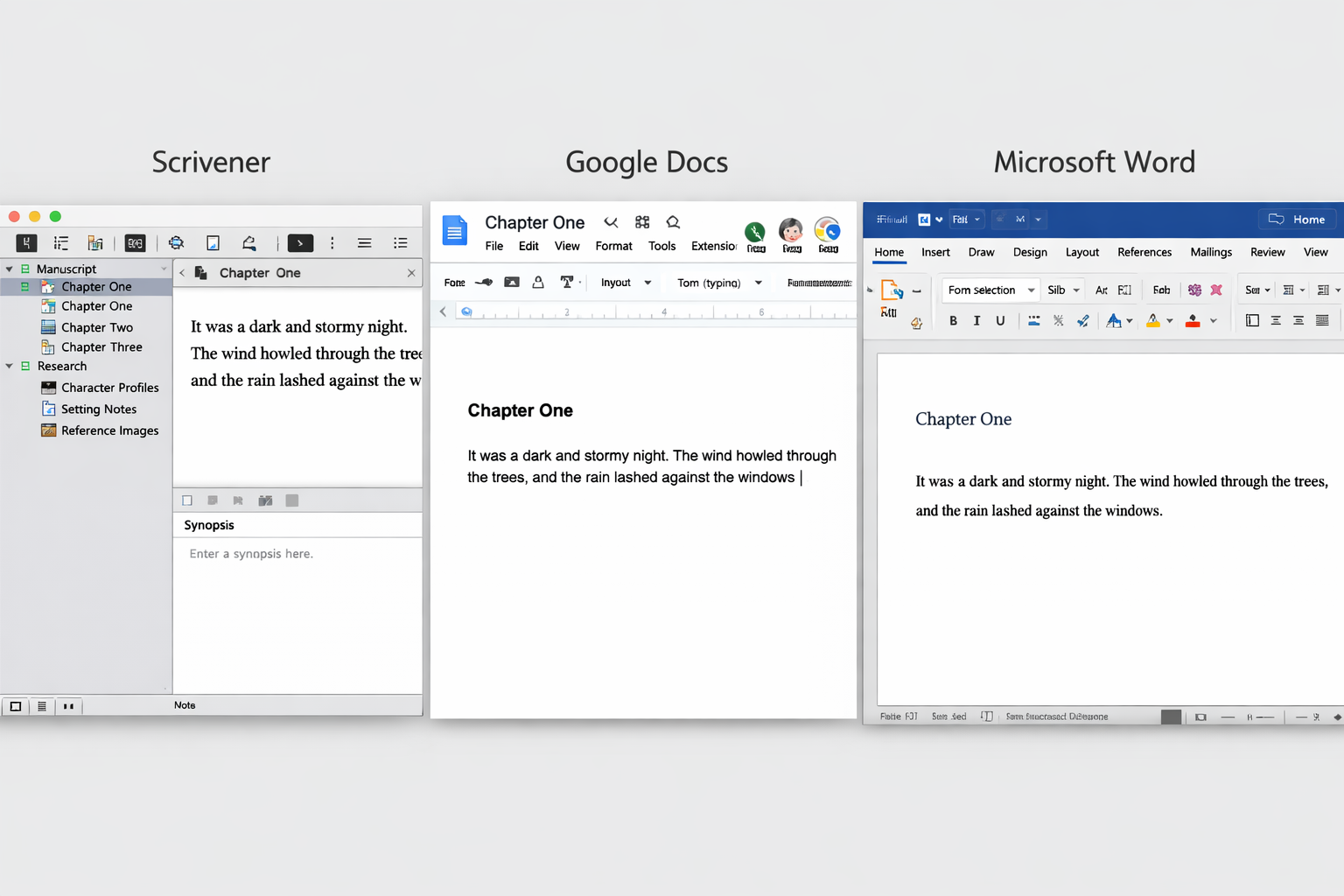
Scrivener stands as the gold standard for serious authors who need comprehensive project management capabilities. This powerful writing a book program offers unmatched organization through its innovative corkboard system, research folders, and manuscript compilation features.
Key Features:
- Drag-and-drop chapter organization allows instant restructuring
- Research integration keeps source materials accessible within projects
- Compilation tools format manuscripts for multiple publishing platforms
- Snapshot system preserves previous versions for easy comparison
Best For: Authors writing complex fiction, academic works, or research-heavy non-fiction who need maximum organizational control.
Pricing: $60 one-time purchase with frequent sales
2. Google Docs: Accessible and Collaborative
Google Docs provides an excellent entry point for new authors seeking a reliable, free writing a book program. Its cloud-based system ensures automatic saving and universal access across devices, while collaboration features enable real-time feedback from editors and beta readers.
Key Features:
- Real-time collaboration with commenting and suggestion modes
- Automatic cloud saving prevents data loss
- Voice typing for hands-free writing sessions
- Simple sharing via links with customizable permissions
Best For: Beginning authors, collaborative projects, and writers who prioritize accessibility over advanced features.
Pricing: Free with Google account
3. Microsoft Word: Industry Standard
Microsoft Word remains the publishing industry’s preferred format, making it a practical choice for authors planning traditional publication routes. Its robust formatting tools and track changes feature facilitate professional editing workflows.
Key Features:
- Industry-standard formatting accepted by publishers
- Advanced track changes for professional editing
- Comprehensive style tools for consistent formatting
- Integration with other Microsoft Office applications
Best For: Authors seeking traditional publication, writers comfortable with familiar interfaces, and those requiring advanced formatting control.
Pricing: $70/year for Microsoft 365 or $150 one-time purchase
4. Grammarly: Writing Enhancement
While not a complete writing a book program, Grammarly serves as an essential companion tool that elevates writing quality through advanced grammar checking, style suggestions, and readability improvements.
Key Features:
- Advanced grammar detection beyond basic spell-check
- Style and tone suggestions for improved readability
- Plagiarism detection for academic and research writing
- Integration with most writing platforms
Best For: Authors prioritizing writing quality, non-native English speakers, and writers seeking professional-level editing assistance.
Pricing: Free basic version, $30/month for premium features
5. Ulysses: Minimalist Excellence
Ulysses appeals to writers who prefer clean, distraction-free environments without sacrificing organizational capabilities. Its markdown-based approach and elegant interface create optimal conditions for focused writing sessions.
Key Features:
- Distraction-free writing environment with customizable themes
- Powerful organization through nested groups and filters
- Goal tracking with detailed writing statistics
- Seamless export to multiple formats including eBook
Best For: Writers who value simplicity, Mac users, and authors who prefer markdown formatting.
Pricing: $40/year subscription
6. Atticus: All-in-One Solution
Atticus combines writing, editing, and formatting capabilities in a single platform designed specifically for independent authors. This comprehensive writing a book program streamlines the entire publishing workflow from first draft to final product.
Key Features:
- Integrated writing and formatting eliminates software switching
- Professional templates for various book genres
- Direct publishing to major platforms
- Collaboration tools for working with editors
Best For: Self-publishing authors, writers seeking all-in-one solutions, and those planning multiple book projects.
Pricing: $150 one-time purchase
7. AI Writing Programs: Emerging Support Tools
Modern AI writing assistants like Claude, ChatGPT, and Jasper offer valuable support for outlining, brainstorming, and overcoming writer’s block. However, these tools work best as supplements to traditional writing programs rather than complete replacements.
Key Applications:
- Outline generation and plot development assistance
- Character development prompts and backstory creation
- Research assistance and fact-checking support
- Editing suggestions for clarity and flow improvements
Best For: Writers seeking creative inspiration, authors struggling with specific scenes, and those needing research assistance.
Understanding effective brainstorming techniques helps maximize AI tools’ potential while maintaining authentic authorial voice.
How to Choose the Best Writing a Book Program
Budget Considerations
Free Options like Google Docs and basic versions of writing apps provide sufficient functionality for many first-time authors. These platforms offer essential features without financial commitment, making them ideal for testing writing consistency before investing in premium tools.
Paid Programs typically offer advanced features like research management, advanced formatting, and professional export options. Consider upgrading when free tools become limiting factors in your writing process.
Essential Features Assessment
Organization Capabilities
Evaluate how each program handles chapter structure, research materials, and note management. Writers working on complex projects benefit from robust organizational systems, while simple stories may require only basic folder structures.
Writing Environment
Consider interface preferences, distraction-free modes, and customization options. Some writers thrive in minimalist environments, while others prefer feature-rich interfaces with multiple panels and tools.
Export and Formatting Options
Assess each program’s ability to format manuscripts for your intended publishing route. Traditional publishers often require specific Word formats, while self-publishers need eBook and print formatting capabilities.
Compatibility and Integration
Device Synchronization
Modern writing requires access across multiple devices. Cloud-based solutions ensure seamless transitions between computers, tablets, and smartphones, maintaining writing momentum regardless of location.
Third-Party Integration
Consider how well each writing a book program integrates with editing tools, research applications, and publishing platforms. Smooth workflows reduce friction and maintain creative focus.
Step-by-Step: How to Use a Writing Program to Write Your Book
Step 1: Project Setup and Organization
Create Your Project Structure
Begin by establishing a clear organizational system within your chosen writing a book program. Create separate folders for chapters, character profiles, research materials, and plot outlines. This initial investment in organization pays dividends throughout the writing process.
Configure Your Writing Environment
Customize interface settings, establish word count goals, and set up any tracking systems your program offers. Many successful authors credit consistent daily goals with helping them maintain productive writing habits.
Step 2: Outline Development
Build Your Story Structure
Use your program’s organizational tools to create detailed chapter outlines, plot point summaries, and character development notes. Most writing programs allow easy rearrangement of sections, enabling flexible story development.
Research Integration
Import relevant research materials, images, and reference documents directly into your project. Having everything accessible within your writing environment eliminates distractions and maintains creative flow.
Step 3: Draft Writing Process
Establish Daily Writing Routines
Set realistic daily word count goals using your program’s tracking features. Consistency matters more than quantity—writing 300 words daily produces better results than sporadic 2,000-word sessions.
Focus on Progress Over Perfection
Resist the urge to edit while drafting. Most writing programs offer distraction-free modes that hide editing tools, encouraging forward momentum rather than perfectionist paralysis.
Step 4: Editing and Refinement
Systematic Revision Approach
Use your program’s commenting and annotation features to mark areas needing attention during initial read-throughs. Many authors find overcoming writer’s block easier when they separate writing and editing phases completely.
Grammar and Style Enhancement
Integrate grammar checking tools like Grammarly or use built-in editing features to polish prose. Focus on clarity, readability, and consistent voice throughout your manuscript.
Step 5: Formatting and Export
Prepare for Publication
Use your program’s formatting tools to prepare manuscripts according to your publishing route requirements. Self-publishers need eBook formatting, while traditional submission requires specific manuscript formatting standards.
Backup and Version Control
Create multiple backup copies and maintain version histories throughout the process. Most cloud-based writing programs handle this automatically, but local backups provide additional security.
Benefits of Using a Writing Program
Enhanced Organization and Productivity
Professional writing software transforms chaotic writing projects into manageable, structured endeavors. Authors report 50% faster completion times when using dedicated writing programs compared to basic word processors, primarily due to improved organization and reduced time searching for materials.
Improved Writing Quality
Built-in editing tools, style guides, and formatting assistance help authors produce more polished manuscripts. Integration with grammar checkers and readability analyzers ensures professional-quality output that requires less extensive editing.
Streamlined Publishing Workflow
Modern writing programs offer direct export to popular publishing platforms, eliminating formatting headaches and reducing time-to-market for finished books. This seamless integration particularly benefits self-publishing authors managing multiple projects.
Common Mistakes to Avoid
Overcomplicating Your Setup
Avoiding Feature Overload
Many writers become overwhelmed by advanced features and abandon their chosen writing a book program before experiencing its benefits. Start with basic functionality and gradually incorporate advanced features as needed.
Consistency Over Complexity
The most sophisticated program provides no value if you don’t use it consistently. Choose tools that match your current skill level and writing habits rather than aspirational complexity.
Constant Tool Switching
Commitment to Single Systems
Frequently changing writing programs disrupts workflow and wastes time learning new interfaces. Commit to one system for at least one complete project before evaluating alternatives.
Migration Challenges
Moving projects between different writing programs often results in formatting loss and organizational disruption. Choose carefully and stick with your decision through project completion.
Over-Reliance on Automation
Maintaining Authorial Voice
While AI writing assistants and automated tools provide valuable support, over-dependence can result in generic, voice-less writing. Use technology to enhance rather than replace creative decision-making.
Backup Responsibility
Even cloud-based programs require regular backups. Technical failures, account issues, or service discontinuation can threaten years of work without proper backup strategies.
Free vs Paid Writing Programs
Free Options: Getting Started
Google Docs and LibreOffice Writer provide robust functionality for beginning authors without financial investment. These platforms offer essential features including cloud storage, basic formatting, and collaboration tools sufficient for most first-time book projects.
Feature Limitations
Free programs typically lack advanced organizational tools, research management systems, and professional formatting options that benefit complex projects or serious authors planning multiple books.
Premium Programs: Advanced Capabilities
Professional Features
Paid writing programs like Scrivener and Ulysses offer sophisticated project management, research integration, and export options that streamline professional workflows. These tools justify their cost through time savings and improved organization.
When to Upgrade
Consider premium options when free tools become limiting factors in your writing process. Signs include struggling with organization, needing advanced formatting, or planning multiple book projects.
For authors exploring non-fiction writing techniques, premium programs often provide specialized templates and organizational systems that significantly improve productivity.
Tips to Finish Your Book Faster
Optimize Your Writing Environment
Distraction-Free Settings
Enable full-screen modes, disable notifications, and use focus timers to maintain concentration during writing sessions. Most writing programs offer customizable environments that eliminate digital distractions.
Goal Tracking Systems
Set daily word count targets and use your program’s progress tracking features to maintain momentum. Visual progress indicators provide motivation and help identify productive patterns.
Workflow Optimization
Batch Similar Tasks
Group writing, editing, and research activities into dedicated sessions rather than switching between tasks constantly. This approach reduces mental fatigue and improves overall efficiency.
Template Utilization
Create chapter templates, character sheets, and scene structures that speed up recurring tasks. Most writing programs allow custom templates that streamline repetitive formatting and organization.
Understanding effective writing practices helps maximize any program’s potential while building skills that transcend specific software choices.
Publishing Preparation and Next Steps
Manuscript Formatting
Industry Standards
Different publishing routes require specific formatting standards. Traditional publishers typically prefer double-spaced Word documents, while self-publishing platforms need properly formatted eBook files with embedded metadata.
Professional Presentation
Use your writing program’s export features to create clean, professional manuscripts that meet submission guidelines. Proper formatting significantly impacts first impressions with agents, editors, and readers.
Publishing Route Considerations
Traditional Publishing Path
Authors pursuing traditional publication should prioritize programs that export clean Word documents and integrate well with industry-standard editing workflows. Consider traditional publishing pros and cons when selecting tools.
Self-Publishing Advantages
Independent authors benefit from programs offering direct eBook formatting and integration with self-publishing platforms. Tools like Atticus and Vellum specialize in creating publication-ready files for multiple formats.
For comprehensive guidance on the self-publishing process, explore essential self-publishing tips that complement your chosen writing program.
Conclusion
The journey from blank page to published book becomes significantly more manageable with the right writing a book program. Whether you choose free options like Google Docs for simplicity or invest in professional tools like Scrivener for advanced features, the key lies in consistent usage rather than perfect software selection.
Success depends on matching tools to your specific needs, budget, and writing style. Beginners often thrive with simple, accessible programs that remove barriers to getting started, while experienced authors benefit from sophisticated organizational and formatting capabilities that streamline complex projects.
Take action today by selecting one writing program and committing to it for your current project. Download your chosen software, set up a basic project structure, and write your first 500 words. The perfect program is meaningless without the discipline to use it consistently—but the right tools make that discipline significantly easier to maintain.
Remember that writing programs are enablers, not magic solutions. They provide structure, organization, and efficiency, but your creativity, persistence, and dedication ultimately determine your book’s success. Choose your tools wisely, then focus on what matters most: telling your story one word at a time.


