

The Complete Guide for First-Time Authors
Imagine holding your finished book for the first time, feeling the weight of your words transformed into a professional publication. That dream becomes reality when you master how to write a book format correctly from the very beginning. Whether you’re crafting your first novel or preparing a non-fiction masterpiece, understanding proper book formatting is the foundation that separates amateur manuscripts from publishable works that captivate readers and impress industry professionals.
Key Takeaways
• Proper manuscript formatting includes standard margins (1-inch), double-spacing, and professional fonts like Times New Roman 12pt
• Chapter structure and organization create a logical flow that guides readers through your content seamlessly
• Industry-standard formatting rules vary between fiction and non-fiction but share common professional elements
• Digital and print formatting require different approaches, with specific requirements for each publishing method
• Professional presentation significantly impacts your chances of acceptance by agents, publishers, and readers
Understanding the Fundamentals of Book Format Structure
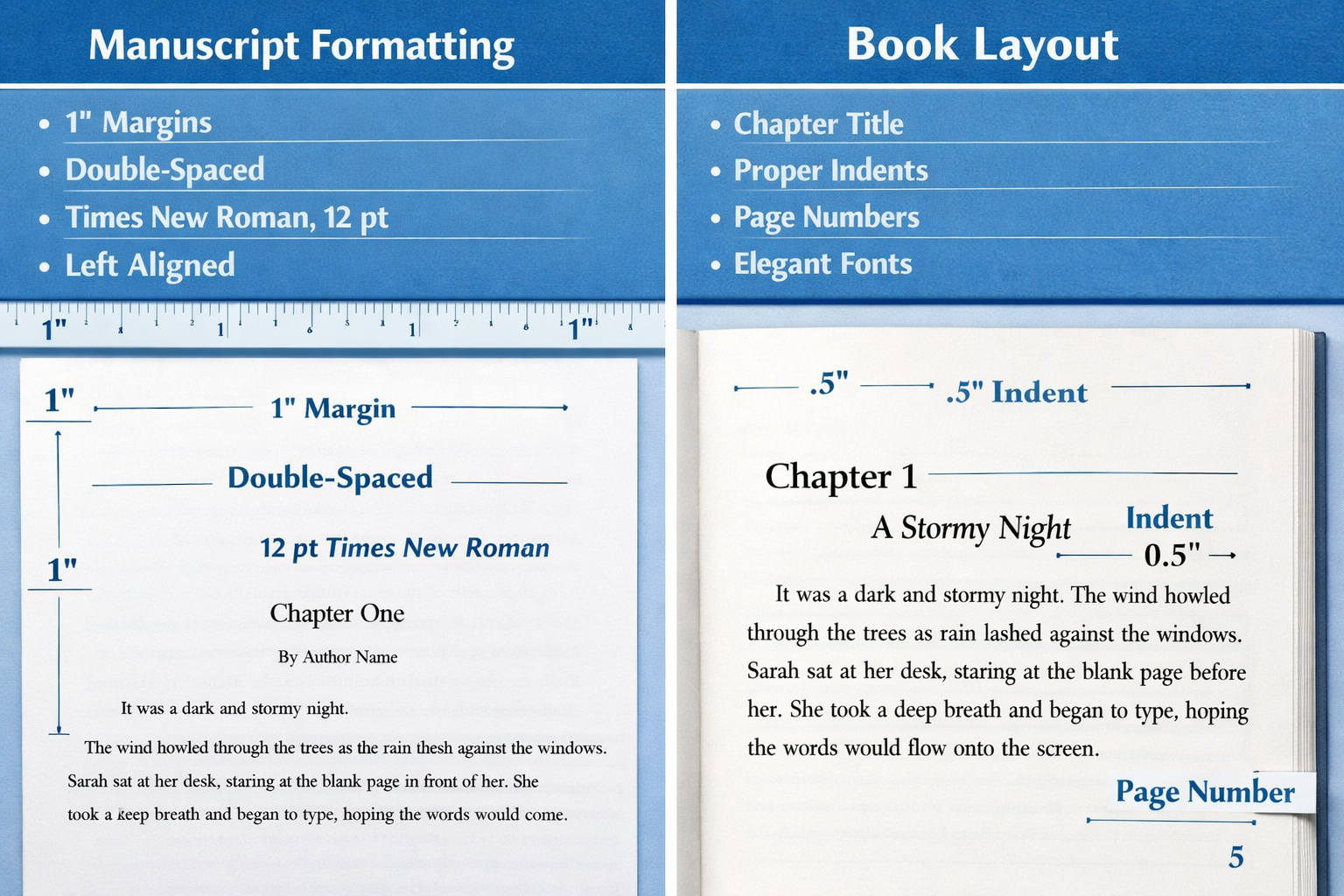
Learning how to write a book format begins with understanding the essential building blocks that form every successful book. These foundational elements create the framework that supports your content and ensures professional presentation.
Essential Components Every Book Needs
Every well-formatted book contains specific structural elements that readers expect to find. The front matter includes your title page, copyright information, table of contents, and any acknowledgments or dedications. This section establishes your book’s identity and provides crucial publishing details.
The main content forms the heart of your book, divided into logical chapters or sections. Each chapter should begin on a new page with consistent formatting throughout. Your content organization directly impacts reader engagement and comprehension.
Back matter completes your book with elements like appendices, bibliography, index, and author biography. These sections provide additional value and establish your credibility as an author.
Manuscript vs. Published Book Formatting
Understanding the difference between manuscript formatting and final book formatting prevents common beginner mistakes. Manuscript formatting follows strict industry standards designed for editor review and agent submission. This includes double-spacing, specific margins, and plain formatting without fancy fonts or graphics.
Published book formatting transforms your manuscript into the final product readers will see. This process involves different spacing, font choices, and layout decisions optimized for reading experience rather than editorial review.
When you’re starting out, focus on mastering manuscript formatting first. This foundation makes the transition to published formatting much smoother, whether you choose traditional publishing or decide to self-publish your book.
Standard Manuscript Formatting Guidelines
Professional manuscript formatting follows industry-standard rules that agents, editors, and publishers expect to see. These guidelines ensure your work looks professional and meets submission requirements.
Font and Typography Requirements
Choose Times New Roman 12-point font for your manuscript body text. This classic typeface offers excellent readability and remains the industry standard. Avoid decorative or unusual fonts that distract from your content.
For headings and chapter titles, you may use the same font in larger sizes or switch to a complementary sans-serif font like Arial. Maintain consistency throughout your manuscript to create a cohesive appearance.
Bold and italic formatting should be used sparingly and purposefully. Reserve bold text for chapter headings and important subheadings. Use italics for emphasis, foreign words, or internal thoughts in fiction writing.
Margins, Spacing, and Page Layout
Set one-inch margins on all sides of your document. This standard provides adequate white space for editor notes and maintains professional appearance. Never reduce margins to fit more text on a page.
Double-spacing throughout your manuscript is non-negotiable for submission purposes. This spacing allows editors to make notes between lines and improves readability during the review process.
Page numbering should appear in the upper right corner of every page except the title page. Include your last name before the page number (e.g., “Smith 15”) to keep pages organized if they become separated.
Header and Footer Information
Create a running header that includes your last name and the book title in the upper left corner of each page. This information helps identify your manuscript if pages become mixed with other submissions.
Contact information belongs only on your title page, not in headers or footers throughout the manuscript. Include your full name, address, phone number, and email address in the upper left corner of your title page.
The word count should appear in the upper right corner of your title page, rounded to the nearest thousand (e.g., “Approximately 75,000 words”). This information helps agents and editors quickly assess your book’s length.
How to Write a Book Format for Different Genres
Different genres require specific formatting approaches that align with reader expectations and industry standards. Understanding these variations ensures your book meets genre-specific requirements.
Fiction Formatting Essentials
Fiction manuscripts follow standard formatting with some genre-specific considerations. Chapter breaks should always start on new pages, with chapter numbers or titles centered and formatted consistently throughout your book.
Dialogue formatting requires proper punctuation and paragraph breaks for each new speaker. Indent dialogue paragraphs normally and use quotation marks according to standard grammar rules. Internal thoughts typically appear in italics to distinguish them from spoken dialogue.
Scene breaks within chapters use either three asterisks centered on a line (***) or extra white space. These breaks signal time or location changes without requiring new chapters.
For aspiring fiction writers, developing strong fiction writing traits enhances both your storytelling and formatting skills.
Non-Fiction Structure and Organization
Non-fiction books require more complex organizational structures than fiction. Chapter subdivisions using consistent heading levels help readers navigate your content. Use a clear hierarchy with main headings, subheadings, and sub-subheadings formatted distinctly.
Research citations and footnotes follow specific academic or industry style guides like APA, MLA, or Chicago Manual of Style. Choose one style guide and apply it consistently throughout your manuscript.
Tables, charts, and images require special formatting consideration. In manuscript form, indicate placement with [INSERT TABLE 1 HERE] and include actual graphics as separate files. For published books, integrate these elements seamlessly into your text flow.
Writers focusing on non-fiction can benefit from proven tips for writing incredible non-fiction books that complement proper formatting techniques.
Memoir and Biography Considerations
Memoirs and biographies blend narrative storytelling with factual presentation. Chronological organization typically works best, though thematic organization can be effective for certain topics.
Privacy considerations may require changing names or identifying details. Include a disclaimer on your copyright page explaining any alterations made for privacy protection.
Photo and document integration adds authenticity to memoirs and biographies. Plan placement carefully and ensure you have proper permissions for any copyrighted materials.
Digital vs. Print Book Formatting Differences
Modern authors must understand both digital and print formatting requirements, as many books appear in multiple formats. Each medium has unique technical requirements that affect your formatting decisions.
E-book Formatting Specifications
E-book formatting prioritizes flexibility and readability across different devices and screen sizes. Unlike print books, e-books allow readers to adjust font size, line spacing, and background colors according to their preferences.
Responsive design principles guide e-book formatting. Avoid fixed spacing, complex layouts, or precise positioning that may not display correctly on all devices. Focus on clean, simple formatting that adapts well to various screen sizes.
Chapter navigation becomes crucial in digital formats. Use proper heading styles that e-reader software can recognize to automatically generate clickable table of contents. This feature significantly improves reader experience and navigation.
Image optimization requires special attention in e-books. Compress images appropriately to reduce file size while maintaining quality. Consider how images will display on both color and black-and-white e-readers.
For comprehensive guidance on digital publishing, explore how to successfully self-publish your writing as an ebook.
Print Book Layout Requirements
Print book formatting involves fixed layouts that remain consistent across all copies. Every element must be precisely positioned, from margins to page numbers to chapter headings.
Gutter margins require special consideration for print books. The inner margin (where pages bind together) needs extra space to prevent text from disappearing into the binding. Typically, add an extra 0.25 to 0.5 inches to inner margins.
Recto and verso pages (right and left pages) may have different formatting requirements. Page numbers often appear on outside edges, and headers may alternate between chapter titles and book titles.
Bleed areas become important if your book includes images or design elements that extend to page edges. Provide at least 0.125 inches of bleed beyond the final trim size to ensure clean printing.
Understanding proper book formatting for self-published authors helps ensure professional results whether you choose print or digital publishing.
Hybrid Formatting Strategies
Many authors now prepare their books for both print and digital distribution. Source document management becomes crucial when creating multiple formats from a single manuscript.
Style-based formatting using word processing software styles allows easy conversion between formats. Instead of manually formatting each element, create and apply consistent styles that can be modified globally when needed.
Content adaptation may be necessary for different formats. Some elements that work well in print may need adjustment for digital formats, and vice versa. Plan these adaptations during your initial formatting process rather than as an afterthought.
Chapter Organization and Structuring Techniques
Effective chapter organization creates a logical flow that guides readers through your content while maintaining engagement. Proper structuring techniques help readers navigate your book and understand your message clearly.
Creating Compelling Chapter Openings
Hook readers immediately with engaging chapter openings that connect to your overall narrative or argument. Each chapter should begin with a clear purpose that advances your book’s main theme or story.
Transition smoothly between chapters by ending each section with a natural bridge to the next topic. This technique maintains reader momentum and creates cohesive flow throughout your book.
Chapter length consistency helps readers develop reading rhythm and expectations. While chapters don’t need identical word counts, aim for relatively similar lengths within your book to maintain pacing.
Subheading and Section Breaks
Hierarchical organization using consistent subheading levels helps readers understand your content structure. Use no more than three heading levels to avoid confusion and maintain clarity.
White space utilization through strategic section breaks gives readers visual rest and helps organize complex information. Don’t be afraid of white space – it improves readability and comprehension.
Parallel structure in your headings and subheadings creates professional appearance and helps readers predict content organization. Use similar grammatical structures and formatting for headings at the same level.
Learning how to write a book outline effectively provides the foundation for strong chapter organization and structure.
Maintaining Consistent Flow
Logical progression ensures each chapter builds upon previous content while introducing new concepts appropriately. Avoid jumping between unrelated topics without clear transitions.
Reader signposting through introductory and summary statements helps readers follow your argument or narrative. Brief chapter introductions and conclusions reinforce key points and maintain focus.
Pacing variation keeps readers engaged by alternating between detailed explanations and quicker-moving content. Consider your reader’s attention span and energy levels when organizing chapter content.
Professional Presentation and Industry Standards
Professional presentation distinguishes publishable manuscripts from amateur attempts. Understanding and implementing industry standards significantly improves your chances of acceptance by agents, publishers, and readers.
Title Page and Front Matter Essentials
Your title page serves as the first impression of your professionalism. Center your book title in the upper third of the page, using title case capitalization. Place your name below the title, followed by contact information in the lower left corner.
Copyright page information includes publication year, copyright notice, ISBN (if applicable), and any legal disclaimers. Even for unpublished manuscripts, include a copyright notice to protect your intellectual property.
Table of contents should list all chapters with accurate page numbers. For fiction, simple chapter numbers usually suffice. Non-fiction may require detailed subheading listings to help readers navigate complex information.
Submission Guidelines Compliance
Agent and publisher requirements vary, but most follow similar basic standards. Research specific submission guidelines for each agent or publisher you contact, as some have unique formatting preferences.
Query letter coordination ensures your submission package presents a cohesive, professional image. Your query letter, synopsis, and manuscript sample should all demonstrate the same level of professional formatting.
File format specifications matter for digital submissions. Most agents prefer .doc or .docx files, though some accept PDF. Never submit in unusual formats unless specifically requested.
Understanding what authors who self-publish must do beyond writing helps you prepare for the complete publishing process.
Common Formatting Mistakes to Avoid
Inconsistent formatting throughout your manuscript signals amateur work to industry professionals. Maintain consistent fonts, spacing, margins, and heading styles from beginning to end.
Over-formatting with excessive bold text, multiple fonts, or decorative elements distracts from your content. Keep formatting simple and professional, letting your words carry the impact.
Incorrect submission format can result in immediate rejection regardless of content quality. Follow submission guidelines exactly, including file naming conventions and required information.
Technology Tools and Software for Book Formatting
Modern technology offers numerous tools to help authors achieve professional formatting results. Understanding available options and their capabilities helps you choose the right tools for your specific needs and budget.
Word Processing Software Options
Microsoft Word remains the industry standard for manuscript preparation. Its robust formatting tools, track changes feature, and universal compatibility make it the preferred choice for most authors and publishing professionals.
Google Docs offers cloud-based convenience and real-time collaboration features. While lacking some advanced formatting options, it provides excellent accessibility and automatic saving that protects your work.
Scrivener specializes in long-form writing projects with powerful organizational tools. Its research management, outline features, and formatting templates specifically serve book authors’ needs.
LibreOffice Writer provides a free alternative with professional formatting capabilities. While not as widely used in publishing, it offers compatibility with standard formats and robust feature sets.
Specialized Book Formatting Tools
Vellum (Mac only) creates professional book layouts for both print and digital formats. Its templates and automated formatting features produce publication-ready results with minimal technical knowledge required.
Adobe InDesign offers professional-grade layout capabilities for complex formatting needs. While requiring significant learning investment, it provides unlimited creative control over your book’s appearance.
Reedsy Design Editor provides browser-based formatting tools specifically designed for book publishing. Its templates and export options streamline the formatting process for self-published authors.
Atticus combines writing and formatting tools in one platform, offering templates for various genres and automatic formatting for multiple output formats.
Quality Control and Proofreading Tools
Grammarly helps identify grammar, spelling, and style issues throughout your manuscript. While not perfect, it catches many errors that manual proofreading might miss.
ProWritingAid offers comprehensive writing analysis including style suggestions, readability scores, and formatting consistency checks. Its detailed reports help improve both content and presentation.
Hemingway Editor focuses on readability and sentence structure, helping you create clear, engaging prose that supports your professional formatting efforts.
Professional proofreading services provide human expertise that automated tools cannot match. Consider investing in professional editing before final formatting to ensure your content matches your professional presentation.
For authors developing their craft, learning about essential writing tools and resources complements technical formatting knowledge.
Conclusion: Mastering Your Book Format for Publishing Success
Mastering how to write a book format transforms your manuscript from a collection of ideas into a professional publication ready for readers. The formatting techniques covered in this guide provide the foundation for presenting your work with the credibility and polish that agents, publishers, and readers expect in 2026.
Remember that proper formatting serves your content, not the other way around. While technical requirements matter, they should enhance your message rather than overshadow it. Start with solid manuscript formatting basics, then adapt your approach based on your chosen publishing path and target audience.
Take action today by implementing these formatting guidelines in your current writing project. Begin with proper margins, spacing, and font choices, then gradually incorporate more advanced techniques as you become comfortable with the basics. Consider investing in quality formatting tools that match your budget and technical skill level.
Your next steps should include reviewing your current manuscript against these standards, researching specific submission guidelines for your target agents or publishers, and developing a consistent formatting workflow for future projects. Whether you pursue traditional publishing or choose the self-publishing route, professional formatting significantly impacts your book’s success potential.
The publishing landscape continues evolving, but professional presentation remains constant. Master these formatting fundamentals now, and you’ll have the technical foundation to adapt to future changes while maintaining the quality standards that distinguish successful authors from aspiring writers.


